IPTV box: do you actually need one?
Short answer: usually not. Before you spend a penny on hardware, here is how every IPTV box option compares, the handful of specs that genuinely matter, and how to set a box up in minutes — written for British living rooms, the Premier League weekend and the great Bank Holiday binge.
TL;DR
- You don't need a dedicated IPTV box. An inexpensive 4K streaming stick, an Android TV box or a modern Samsung/LG Smart TV already runs IPTV UK through a free player app.
- Buy a box only if your telly is older or can't install apps — or if you want extra storage, an Ethernet port and a little more power.
- The specs that matter: 4K with HEVC decoding, 2GB+ RAM, an official app store with updates, and a wired or strong 5GHz connection.
- Avoid "pre-loaded" boxes. Hardware sold with content baked in is a piracy red flag and entirely unnecessary with a legitimate service.
- Best value for most homes: a current-generation 4K streaming stick. Best for power users: a well-specified Android TV box.
Do you need an IPTV box? The honest answer
No — most people do not need a special IPTV box. If you own a streaming stick, an Android TV box, a games console-era Smart TV from a recognised brand, or a recent Samsung or LG television, you already have everything required to watch IPTV UK. You install one free player app, sign in with the details from your welcome email, and you are watching live channels and on-demand films within a few minutes. There is no proprietary receiver to buy, no engineer's visit, and no twelve-month tie-in to a single piece of hardware.
The phrase "IPTV box" is one of those terms that sounds far more specialised than the reality. In the days of cable and satellite, the box was non-negotiable: a heavy set-top receiver, leased from the provider, decoding a signal that arrived down a dedicated cable or from a dish bolted to the gable end. Internet Protocol Television rewrote that rulebook. Because the stream travels over your ordinary home broadband, the "box" is nothing more exotic than a small computer that runs an app — and you may well have three or four devices around the house that already qualify.
So when does buying a box make sense? In a few clear situations. If your television is more than six or seven years old and its built-in app store has been abandoned, a £35 streaming stick instantly modernises it. If your set's native software is sluggish — slow to wake, slow to switch channels, slow to load the guide — a dedicated box is a night-and-day upgrade for the price of a takeaway. And if you are the sort of viewer who wants local storage, an Ethernet socket, or the freedom to install anything from a full app store, an Android TV box earns its keep. Outside those cases, the honest advice is to try the service on the kit you already own before you spend anything at all.
That candour is deliberate. Plenty of corners of the market are happy to upsell you a box you do not need, often a no-name unit with an alarming markup. We would rather you start with a free trial on your existing television, confirm the picture holds rock-steady through a wet Tuesday-night fixture, and only then decide whether a dedicated box adds anything for your particular setup. The right answer is the one that gives you the steadiest stream for the least money — and that is frequently "nothing extra required".
What an IPTV box actually is
An IPTV box is simply a compact streaming computer. It takes the video stream arriving over your broadband, decodes it, and outputs a clean picture to your television through HDMI. Everything that makes it feel like "telly" — the channel list, the programme guide, the on-demand library — is drawn by the player app, not by the box itself. The box provides the processor, the memory, the network connection and the video decoder; the app provides the experience.
Understanding that split is the key to buying well, because it tells you exactly which specifications are worth paying for. You are not buying channels when you buy hardware — a legitimate provider supplies those through your sign-in. You are buying the ability to decode a high-quality stream smoothly and to run a modern app without stutter. That is a far smaller, far cheaper shopping list than the marketing around "IPTV hardware" would have you believe.
The four jobs every box performs
Whatever shape it takes — a stick, a puck, a set-top box or a chip built into your television — the device is doing four things at once. First, it connects, pulling the stream over Wi-Fi or Ethernet. Second, it decodes, using a hardware video decoder to unpack the compressed picture, ideally in the efficient HEVC (H.265) format that modern 4K relies upon. Third, it runs the app, holding the channel list, guide data and artwork in memory so menus feel instant. Fourth, it outputs the finished picture to your TV at the highest resolution both devices support.
Stick, box, set-top or built-in?
These are four physical formats for the same fundamental job. A streaming stick is a thumb-sized unit that plugs straight into HDMI and hides behind the screen — the neatest, best-value route for most homes. An Android TV box is a small puck or square unit that typically adds more RAM, more storage, an Ethernet port and a full app store. A dedicated set-top box (STB) resembles a traditional receiver and suits older televisions with no smart features at all. And a Smart TV has the box built in, so the only "hardware" you add is nothing — you simply install the app on the set you already own. The right format is dictated by your television and your habits, not by price alone.
Crucially, none of these formats locks you to a single provider. Because IPTV UK is delivered through standard player apps and an open sign-in, you can switch devices whenever you like and carry your subscription with you — from the living-room stick to a phone on the train to a compact box thrown in the suitcase for a week away.
IPTV box vs a traditional set-top box
An IPTV box and a traditional cable or satellite set-top box do the same job in opposite ways. The old receiver was leased from a single provider, locked to their signal and tied to a long contract; the day you left, the box went back in the post. An IPTV box is hardware you own outright, running standard player apps over the broadband you already pay for — no dish, no engineer's visit, no twelve-month handcuffs. For most IPTV box UK buyers, that shift from rented gatekeeper to owned, open device is the whole appeal.
The contrast runs deeper than ownership. A leased receiver is a single-purpose object: it does exactly what the provider permits and nothing else, and it is obsolete the moment you change supplier. An IPTV box is a general-purpose streaming computer — it runs the apps you choose, updates over time, and outlives any one subscription. When the contract on traditional pay-TV ends, you are left with a box that belongs to someone else. When you finish with an IPTV box, you still own a perfectly good streaming device you can repurpose, gift or take on holiday.
| Aspect | Traditional set-top box | IPTV box |
|---|---|---|
| Ownership | Leased — must be returned | Owned outright |
| Signal source | Dish or dedicated cable | Your home broadband |
| Contract | Often 12–24 months | No lock-in |
| Installation | Engineer visit, drilling | Plug in, install app |
| Bad-weather resilience | Dish can drop out | Unaffected by weather |
| Devices supported | One proprietary box | Sticks, boxes, Smart TVs, phones |
| Portability | Fixed to the property | Travels in hand luggage |
None of this means a traditional box is useless — it means it answers a question most British homes no longer need to ask. Once your broadband is good enough to carry a steady stream, and it almost certainly is, the leased receiver becomes the expensive way to do something a £35 device does more flexibly. That is the quiet revolution behind the rise of the IPTV box: not a new kind of television, but a far less restrictive way to own the hardware that delivers it.
The four ways to watch — every IPTV box option compared
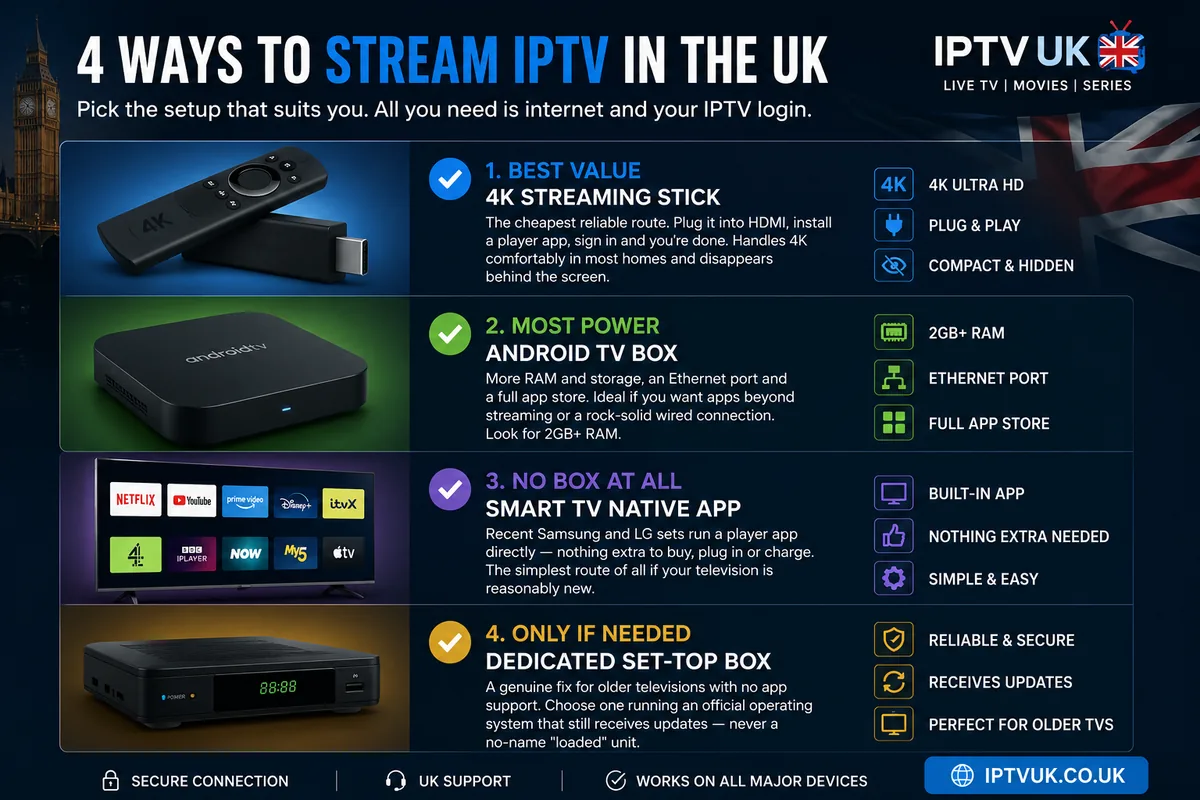
There are four sensible routes to watching IPTV on the big screen, and the best one depends entirely on the television you already own. The comparison below lays out what each option costs in effort and money, who it suits, and where it falls short — so you can match the route to your living room rather than to a sales pitch.
| Route | Best for | Value | Power | Setup effort | The catch |
|---|---|---|---|---|---|
| 4K streaming stick | Most UK homes | Excellent | Good | Minimal | Wi-Fi only on most models |
| Android TV box | Power users, big libraries | Good | High | Low | Quality varies by brand |
| Smart TV (native app) | Recent Samsung/LG owners | No box needed | Varies | Minimal | Older sets lose app support |
| Dedicated STB | Very old or non-smart TVs | Situational | Varies | Low | Only worth it as a fix |
4K streaming stick
The cheapest reliable route. Plug it into HDMI, install a player app, sign in and you're done. Handles 4K comfortably in most homes and disappears behind the screen.
Android TV box
More RAM and storage, an Ethernet port and a full app store. Ideal if you want apps beyond streaming or a rock-solid wired connection. Look for 2GB+ RAM.
Smart TV native app
Recent Samsung and LG sets run a player app directly — nothing extra to buy, plug in or charge. The simplest route of all if your television is reasonably new.
Dedicated set-top box
A genuine fix for older televisions with no app support. Choose one running an official operating system that still receives updates — never a no-name "loaded" unit.
Read the table as a decision aid rather than a league table. If your set is recent, the native-app route is unbeatable for tidiness. If it is a few years old but otherwise excellent, a streaming stick brings it bang up to date for pocket money. If you are a tinkerer who wants Ethernet and headroom, the Android TV box rewards you. And if you are nursing a much-loved older telly that simply has no apps, a dedicated STB keeps it in service. Every one of these routes ends at the same place: a clean player app and your own sign-in. Not sure which suits you? Our streaming box quiz matches you to the right one in four questions.
Best IPTV box: the spec checklist that actually matters
The best IPTV box is the one that nails five specifications — everything else on the box is noise. Marketing loves to bury you in octa-core figures and inflated storage numbers, but live television is undemanding in surprising ways and demanding in specific ones. Buy against the checklist below and you will never overpay for a box, nor be caught out by stutter on the one fixture you actually wanted to watch.
4K output with HEVC (H.265) decoding
This is the single most important spec. HEVC is the codec modern 4K streams use to deliver a crisp picture without saturating your line. A box with hardware HEVC decoding unpacks that stream effortlessly; a box without it stutters or falls back to a softer picture. Insist on "4K HDR, HEVC/H.265" in the specification.
At least 2GB of RAM
RAM is where the app holds your channel list, programme guide and on-demand artwork. With 2GB the interface stays snappy; with 3GB or 4GB you get genuine headroom for the guide and multitasking. The 1GB bargain boxes are the usual culprits behind slow menus and mid-stream hesitation — a false economy every time.
An official operating system with an app store
Choose a box running a recognised, up-to-date platform with a genuine app store, so you can install trusted player apps and receive security updates. This is exactly what rules out the "pre-loaded" units: a legitimate box arrives clean and lets you install the apps you choose.
Wired Ethernet or strong 5GHz Wi-Fi
For 4K and live sport, a stable connection beats raw speed every time. An Ethernet port is the gold standard; if the box is Wi-Fi only, make sure it supports the 5GHz band and can sit within clear line of sight of your router. Connection stability is the quiet hero of buffer-free viewing.
A recognised brand that issues updates
A box from an established maker receives firmware and security updates for years; a no-name clone is frozen the day it ships. Updates keep the apps compatible and the box secure — a small detail that decides whether your purchase is still flawless three football seasons from now.
Notice what is not on the list: enormous storage, exotic core counts, gamer-grade graphics. Live television and on-demand streaming lean on the video decoder and a steady connection, not on raw compute. A modest box that ticks all five boxes above will outperform a spec-sheet monster that skimps on HEVC or ships with abandoned software. Spend where it counts and the picture rewards you all season.
How much does an IPTV box cost in the UK?
A capable IPTV box costs between roughly £30 and £120 in the UK, and most households never need to spend near the top of that range. The single biggest saving is the one many people miss entirely: if your television is reasonably recent, the best IPTV box is the one already built into it, and your outlay is nothing at all. For everyone else, a 4K streaming stick at the price of a decent takeaway covers the vast majority of homes with room to spare.
It helps to think of IPTV hardware in four clear price tiers. Each one buys a meaningful step up in headroom, but — and this is the part the marketing rarely admits — most people are perfectly served by the first or second rung. The table below sets out what your money actually gets you at each level.
| Tier | Typical price | What you get | Best for |
|---|---|---|---|
| Use what you own | £0 | The native player app on a recent Smart TV — no extra hardware | Recent Samsung/LG owners |
| Entry — best value | £30–£50 | A 4K streaming stick with HEVC and 5GHz Wi-Fi | Most UK homes |
| Mid-range | £50–£90 | An Android TV box with 3–4GB RAM and an Ethernet port | Power users, wired setups |
| Premium | £90–£120+ | High RAM, newer codecs such as AV1, a sturdier build | Future-proofers, AV enthusiasts |
The temptation, as ever, is to overspend on numbers you will never feel. For a single 4K television in the living room, an entry-level streaming stick does everything the average household asks of it, and the leap to a mid-range box is worthwhile only if you specifically want wired Ethernet, extra storage or the headroom that comes with more RAM. Premium boxes are genuinely excellent, but they are built for the AV enthusiast and the committed future-proofer rather than the Saturday-afternoon football fan — choose one because you want it, not because you have been told you need it.
Set those figures against the old way of watching and the maths reframes itself entirely. A leased receiver folded into a monthly bill quietly costs you for years and is never yours to keep; a one-off spend of around £40 on a box you own outright is roughly the price of a couple of rounds at the pub, paid once and forgotten. That is the quiet economy behind the best IPTV box choices — you buy the hardware a single time and it earns its keep season after season.
There is no metered running cost to the box itself beyond the trickle of electricity any small device draws; the only ongoing outlay is your subscription and the broadband you already pay for. For IPTV box UK shoppers, that predictability — buy the hardware once, pay a flat subscription, never watch a surprise rental creep onto a bill — is a large part of the appeal, and a refreshing change from the way television used to be sold.
IPTV box performance, by the numbers
Hardware quality shows up as playback reliability, not headline resolution. A correctly specified box and a modern Smart TV app deliver stutter-free 4K in the vast majority of viewing sessions; under-powered and ageing boxes drop frames precisely when it matters — the goal that decides the match, the knockout blow on a big fight night. The first chart estimates how often each device class plays back smoothly across a typical month of UK viewing; the second shows how little bandwidth high-quality video really needs when the box decodes it efficiently.
Stutter-free 4K playback by device class
Estimated share of live sessions that play back without buffering or dropped frames. Illustrative, based on typical UK home setups.
The top three options are separated by rounding error. The gap that matters is the one below them — the price of skimping on RAM, HEVC support or software updates.
Bandwidth headroom by picture quality
Recommended steady throughput per single stream when the box decodes HEVC efficiently. Headline line speed can be far lower than you'd expect.
A typical British fibre connection clears the 4K figure with room to spare. Stability, not raw speed, is what keeps the picture locked during the Premier League weekend.
The lesson from both charts is the same one the spec checklist made: pay for HEVC, RAM and a stable link, and your everyday broadband becomes more than enough. The households that suffer buffering are rarely the ones on slow lines — they are usually the ones running a bargain box that cannot decode efficiently, or leaning on a congested 2.4GHz Wi-Fi signal three rooms from the router. Fix the box and the connection, and the bandwidth takes care of itself.
Android box setup: step by step
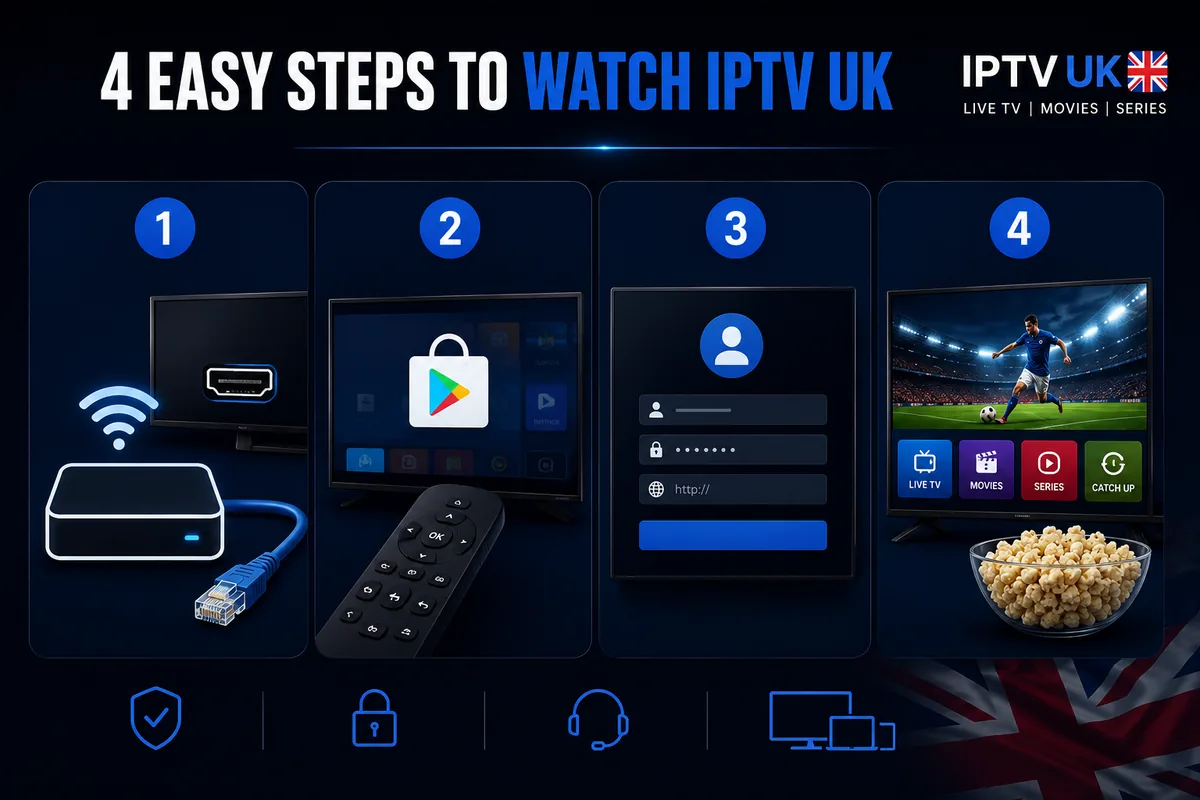
Setting up IPTV on an Android box takes four steps and no technical knowledge. You connect the box, install a player app, sign in with the Xtream Codes details from your welcome email, and let it load your channels. Below is the universal sequence; it is identical whether you are setting up a streaming stick behind the telly or a full Android TV box wired in by Ethernet.
Connect and update the box
Plug the box into a free HDMI port, connect it to Wi-Fi or — better still — Ethernet, and sign in to your account. Install any pending system update first, so the box is on the latest firmware before you add anything. This single habit prevents most early hiccups.
Install a player app
Open the official app store and install a trusted player — IPTV Smarters Pro, TiviMate or IBO Player are all excellent. Each is a clean, empty app: it contains no channels until you sign in, which is exactly how a legitimate setup should look.
Log in with Xtream Codes
Open the app and choose Login with Xtream Codes API. Paste the username, password and server URL from your welcome email. Prefer a single file instead? Choose the M3U option and paste your playlist link. Either route signs you in securely.
Sync and watch
Select Add User and let the box pull down your channel list, programme guide and on-demand library. Open Live TV, pick a channel and press play. From cold box to live football is typically under five minutes.
If anything stalls, the fix is almost always the connection rather than the box: switch to Ethernet or move closer to the router, restart the box, and confirm your speed. For a device-by-device walkthrough across streaming sticks, Android boxes and Smart TVs, see our device setup guides, and for app-specific screens our IPTV player setup guides cover each player in detail. Prefer to start on a streaming stick? Our dedicated IPTV Firestick guide takes you through that route end to end.
Get the best picture from your box: the settings that matter
A box set up on its defaults usually looks good; a box set up deliberately looks its best. Streaming sticks and Android boxes ship on safe, conservative settings so they work on any television, which means a few minutes in the menus can unlock a noticeably sharper, smoother picture. None of this is technical — it is four toggles, done once, that make every fixture and every film look the way the hardware intended.
Match the output resolution to your television
Open the box's display settings and set the output to the highest resolution your TV supports — 4K (2160p) on a 4K set, 1080p on a Full HD one. Leaving a 4K box on an "auto" or 1080p default is the commonest reason a brand-new setup looks softer than expected. Set it explicitly and the box stops second-guessing the screen.
Switch on HDR where both devices support it
If your television and box both handle HDR, enable it. High Dynamic Range widens the range between the darkest and brightest parts of the picture, and it is the single biggest visible upgrade on quality content — the floodlit green of a night match, the depth of a dark thriller. Check the HDMI port, too: 4K HDR needs an HDMI 2.0 or later input, usually labelled on the TV.
Sort the audio output
Set the box's audio to match your setup — stereo for the TV's own speakers, or passthrough for a soundbar or AV receiver. Getting this right prevents the most irritating fault of all, audio drifting a fraction out of sync with the picture, which is far more noticeable on a live broadcast than any softness in the image.
Keep the firmware and apps current
Finally, turn on automatic updates for both the box's firmware and your player app. Updates keep the apps compatible, patch security holes and often improve playback under the bonnet. A box that updates itself is one you never have to think about again — exactly the relationship you want with a piece of IPTV hardware. With those four settings sorted, the box is configured for the long haul.
Wi-Fi or Ethernet? Getting a stable signal to your box
For live television, a wired Ethernet connection is the most reliable choice every time. A cable removes the two things that wreck Wi-Fi — interference from neighbouring networks and congestion from every other device in the house — and delivers the box a clean, constant signal. If your box has an Ethernet port and your router is within reach of a cable, use it; the difference on a busy Saturday afternoon is unmistakable.
Where a cable simply will not reach, Wi-Fi is perfectly capable, provided you set it up sensibly. Connect to the 5GHz band rather than the older, more crowded 2.4GHz one: 5GHz is faster and far less prone to interference, at the cost of a shorter range. Keep the box within clear line of sight of the router where you can, and avoid burying it behind a thick wall or a metal media unit. If the router lives at the other end of the house, a mesh node or a powerline adapter in the same room as the telly often transforms reliability for a modest outlay.
It is worth repeating the most counter-intuitive point in this whole guide: stability beats raw speed. A rock-steady 30 Mbps connection will out-perform an erratic 200 Mbps one for live broadcast, because television cannot pause and re-buffer the way a download can — it has to arrive on time, frame after frame. When people blame "the IPTV" for stuttering, the cause is nearly always a flaky last few metres of Wi-Fi, not the stream itself. Sort the connection between router and box, and the picture locks in for the night.
One more British-specific note. Our weather is hard on rooftop dishes and aerials; heavy rain and high winds famously scramble satellite pictures at the worst possible moment. A box streaming over broadband sidesteps that entirely — the signal arrives down the line regardless of what the weather is doing outside. It is one of the quiet pleasures of the format: the storm rattling the windows has no vote on whether you see the goal.
Troubleshooting an IPTV box: quick fixes that work
Almost every IPTV box fault traces back to the connection, the app, or a setting — not the stream itself. Before you blame the service, run through the short sequence below; it resolves the overwhelming majority of issues UK viewers report. The golden rule is to change one thing at a time so you know which fix did the job.
If the picture buffers or stutters
Start with the network, because this is the cause in the vast majority of cases. Switch the box to Ethernet if you can, or move it onto 5GHz Wi-Fi closer to the router. Restart the box, then restart the router for good measure. If only one channel struggles while the rest are flawless, the issue is that single source, not your setup — try it again later. For a deeper checklist, our guide to fixing IPTV buffering walks through every fix in order.
If a channel won't load at all
First confirm other channels play — if they do, the connection is fine and the one channel is simply busy or temporarily down. If nothing loads, sign out and back in to refresh your details, and double-check the server URL was entered exactly as it appears in your welcome email. A single mistyped character is a classic culprit.
If the audio drifts out of sync
This is almost always an audio-output setting rather than a stream fault. In the box's sound menu, switch between stereo and passthrough, and if you use a soundbar try toggling its own audio-delay (lip-sync) control. Restarting the box after changing the setting usually locks the picture and sound back together.
If the app crashes, freezes or feels sluggish
Clear the player app's cache in the box's settings, then restart. If menus are persistently slow, the box is likely short on memory — a reminder that 2GB of RAM is the floor, not a target. Make sure both the app and the box firmware are fully updated, since an out-of-date pairing is a frequent cause of crashes. If a budget no-name box keeps falling over no matter what you try, the honest fix is better IPTV hardware rather than more troubleshooting.
Keep that order in mind — connection, login, settings, then hardware — and you will diagnose nearly anything in a couple of minutes. And if you would rather not work through it alone, our team is on the 24/7 live support chat to talk you through it whatever the hour.
The "pre-loaded box" trap — and why we don't sell them
Never buy a box sold "pre-loaded" or "fully loaded" with content. A legitimate IPTV box arrives clean: you install a trusted, empty player app and sign in with your own details. When a seller advertises hardware with channels already baked in, it is a clear signal that the content is not rights-cleared — and you inherit both the legal exposure and the security risk that comes with software nobody can vouch for.
The practical problems pile up quickly. A loaded box runs unknown apps from unknown sources, frozen on whatever software it shipped with and never updated. It breaks the moment a source disappears, leaving you with a paperweight and no support. And because the appeal of these units is entirely about dodging the proper route, the "bargain" tends to evaporate within weeks. It is the streaming equivalent of a dodgy motor sold in a pub car park: cheap until it isn't.
This is why our advice is consistent and, frankly, commercial in your favour, not ours: buy a clean box from a recognised brand, or use the device you already own, and bring your own subscription to it. IPTV UK distributes only rights-cleared content in the regions it serves, delivered through standard apps and your personal sign-in. There is nothing to pre-load, nothing baked in, and nothing that ties you to one piece of mystery hardware. You stay in control of the box, the app and the account — exactly as it should be.
If you want the wider picture on how a trustworthy service is structured and what separates a genuine operator from a fly-by-night reseller, our guide to whether IPTV is legal in the UK sets out the distinction in plain terms, and our best IPTV UK buyer's guide gives you a six-point framework for judging any provider before you part with a penny.
Your IPTV box through a British year
A good IPTV box earns its place by being invisible. You should never think about it again after setup — it just turns the telly into whatever you fancy, season after season. Picture how that plays out across a typical British year, because the rhythms of our viewing are exactly what a box is for.
It starts on a Premier League weekend. Saturday lunchtime kick-off, the early fixtures stacked up, mates round and the kettle on. The box wakes instantly, the channel list is already there, and the picture holds in crisp 4K while the rain hammers the conservatory roof — no dish to lose signal, no aerial to rattle loose. The only argument is about the formation, not the feed. That is the pub-banter test, and a properly specified box passes it without anyone noticing it exists.
Then comes the long dark stretch of a British winter, when the evenings draw in by half four and a box-set becomes a survival strategy. The on-demand library turns a grim Tuesday into a binge with no ad breaks and no waiting for the next episode to download. By the time the Bank Holiday rolls around — that gloriously empty Monday with nowhere to be — the same box carries you through a full day of films, catch-up and whatever the kids have decided is the programme of the moment, all from the one device behind the screen.
Summer brings its own use. The streaming stick comes off the telly, goes in the suitcase, and plugs into the HDMI port of a holiday-let television in Cornwall or the Costa del Sol. Connect it to the local broadband and your sign-in works just as it does at home, subject to the quality of the line at the other end. The box that anchors the living room all winter doubles as the one that travels — which is rather the whole appeal of hardware that fits in a coat pocket.
None of this requires you to think about specifications, codecs or connection types ever again. You sorted those once, on the day you set the box up. After that, the technology gets out of the way and you are left with the only thing that ever mattered: the match, the film, the series, on demand, in the corner of a British living room, holding steady whatever the weather is doing outside.
Try IPTV UK on the box you already own
Before you spend a penny on hardware, try the service free on your existing telly, streaming stick or Android box. See how steady the picture holds through a live fixture — then decide whether you need a box at all. Our team is on hand around the clock if you'd like a hand getting started.
What you can watch on the box
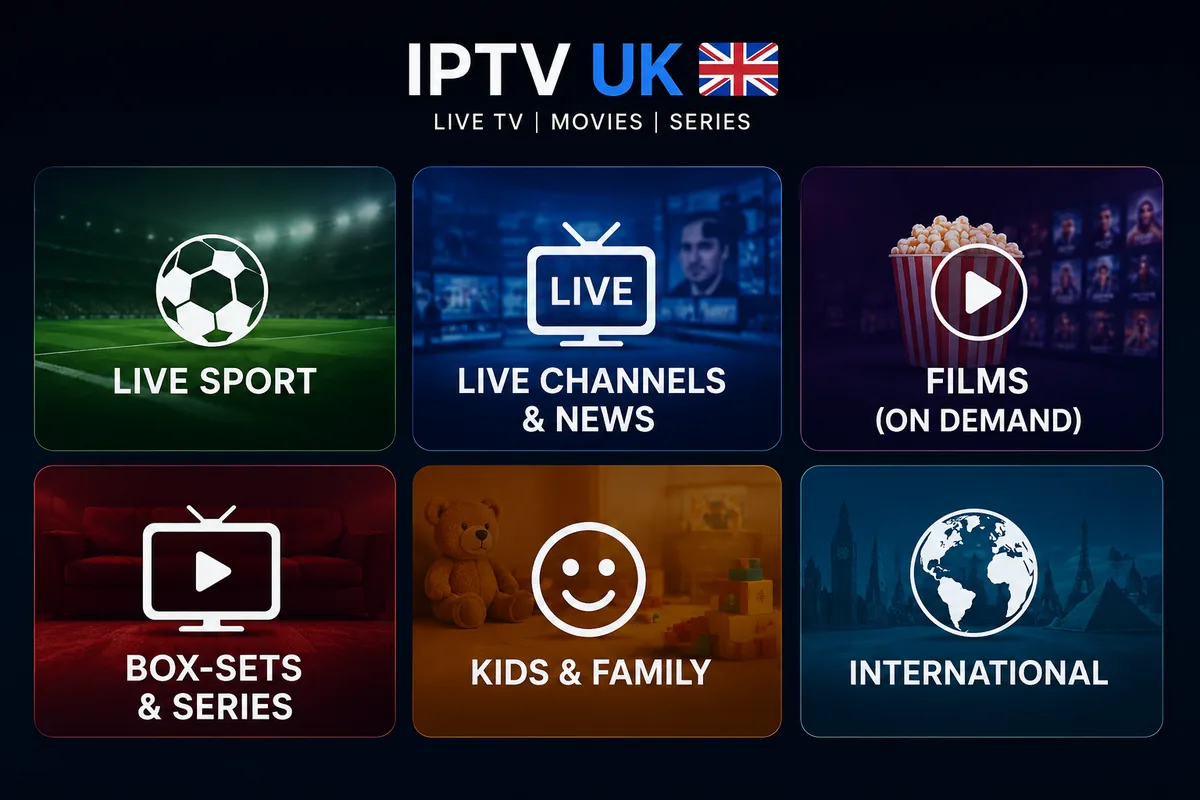
A single IPTV box gives you every content category through one tidy app. Rather than juggling a separate subscription and a separate icon for each type of viewing, the box pulls live channels, on-demand films and box-sets into one place, with the programme guide and search tying it together. The table below breaks down what sits in each category and the bandwidth it asks of your line at the top quality tier.
| Category | What's inside | Top quality | Steady bandwidth at 4K |
|---|---|---|---|
| Live sport | Football, the Premier League weekend, boxing, rugby, racing, big PPV nights | Up to 4K | ~25 Mbps |
| Live channels & news | Entertainment, documentaries, rolling news, music | HD–4K | ~10–25 Mbps |
| Films (on demand) | New releases and a deep back-catalogue, watch any time | Up to 4K | ~25 Mbps |
| Box-sets & series | Full seasons for an ad-free binge, episode after episode | HD–4K | ~10–25 Mbps |
| Kids & family | Cartoons, family films and the programme of the moment | SD–HD | ~6–10 Mbps |
| International | Channels from across Europe, Asia and beyond | SD–HD | ~6–10 Mbps |
The headline is range, not just quality. Because every category lives behind the same sign-in, the box stops being a single-purpose gadget and becomes the one device the whole household reaches for — the match for one person, the box-set for another, the cartoons for the little ones on a wet morning. For a fuller breakdown of what's available, see our IPTV channels and content guide.
Future-proofing your box: making the right one last
The cheapest box is rarely the best value over time; the best IPTV box is the one you buy once and forget. A unit that scrapes by today will feel sluggish in a season or two as apps grow and streams get richer, while a slightly better-specified box sails on for years. Buying with a little headroom is not extravagance — it is the most economical choice across the life of the hardware, which is exactly how a careful British shopper thinks about anything that plugs into the telly.
Codec headroom keeps the picture current
HEVC (H.265) is the codec behind today's efficient 4K, and it is non-negotiable. The forward-looking bonus is a box that also supports newer formats such as AV1: as streams adopt more efficient codecs, a box that can decode them keeps delivering the sharpest possible picture on the same broadband line. A box frozen on yesterday's codecs is the one that starts to look soft first.
RAM and storage you won't outgrow
Treat 2GB of RAM as the floor and 3–4GB as the comfortable choice for a box you intend to keep. The extra memory absorbs years of app updates, a fuller programme guide and the on-demand artwork that makes browsing a pleasure rather than a wait. A touch more storage, likewise, leaves room for the apps the household inevitably adds over time.
Updates are the quiet difference-maker
A box from a recognised maker keeps receiving firmware and security updates long after purchase; a no-name clone is abandoned the day it ships. Those updates are what keep the apps compatible and the box safe season after season — the unglamorous spec that quietly decides whether your purchase is still flawless three football campaigns from now. It is the difference between IPTV hardware you buy once and a box you grumble about replacing every other year.
Put simply: choose the box that nails the five-spec checklist with a little room to spare, connect it well, keep it updated, and it disappears into the background of your living room for the long haul — which is precisely what good hardware is supposed to do. Get that single decision right and the question of whether you need an IPTV box stops being a worry and becomes a solved one: one less thing to think about on a Saturday afternoon with the football on and the kettle going.
IPTV box FAQ
Do I need a special IPTV box?
No. In most cases you do not need a dedicated IPTV box. An inexpensive streaming stick, an Android TV box, or a modern Samsung or LG Smart TV will run IPTV UK through a free player app. Buy a separate box only if your television is older or cannot install apps.
What is the best IPTV box?
For most UK homes the best IPTV box is a current-generation 4K streaming stick or a well-specified Android TV box with 2GB or more of RAM and 4K HDR output. The best box for you is the one that supports the player apps you want, outputs the resolution your TV can display, and receives regular software updates.
What should I look for in an IPTV box?
Check five things: 4K and HEVC (H.265) hardware decoding, at least 2GB of RAM, an up-to-date operating system with an official app store, the option of wired Ethernet or strong 5GHz Wi-Fi, and a recognised brand that issues updates. Avoid no-name boxes sold "pre-loaded" with content.
Is a streaming stick better than an Android TV box?
A 4K streaming stick is the best value for most people and handles IPTV beautifully. An Android TV box is the better choice if you want more storage, an Ethernet port, more RAM for multitasking, or apps beyond streaming. Both run the same player apps and deliver the same picture quality when correctly specified.
Can I use my Smart TV instead of an IPTV box?
Yes. A recent Samsung or LG Smart TV can run IPTV directly through a native player app — no box, no extra remote, nothing extra to plug in. A dedicated box is only worth adding if your TV's built-in software is slow, no longer updated, or lacks the app you want. See our Smart IPTV guide for the native-app route.
Why should I avoid "pre-loaded" or "fully loaded" boxes?
Boxes advertised as "fully loaded" or "pre-configured" with content are a red flag for piracy and entirely unnecessary. With a legitimate service you install a clean, empty player app and sign in with your own details. A reputable provider distributes only rights-cleared content and never ships a box with channels baked in.
How much RAM does an IPTV box need for 4K?
At least 2GB of RAM is the practical minimum for smooth 4K IPTV, with 3GB or 4GB giving extra headroom for the programme guide, on-demand artwork and multitasking. Under-powered 1GB boxes are the most common cause of stutter and slow menus.
Should I connect my IPTV box by Wi-Fi or Ethernet?
Ethernet is the most reliable choice and well worth it for 4K and live sport, because a wired link removes interference and congestion. If you must use Wi-Fi, use the 5GHz band and keep the box within clear line of sight of the router. A stable connection matters far more than raw headline speed.
How much internet speed does an IPTV box need?
Around 25 Mbps of steady throughput is comfortable for a single 4K stream, 10 Mbps for Full HD and 5–6 Mbps for HD. Consistency matters more than the headline figure: a stable 30 Mbps line outperforms an erratic 200 Mbps one for live television.
Will any IPTV box work with IPTV UK?
Yes. IPTV UK works on any device that can install a standard player app and sign in with an Xtream Codes or M3U login — streaming sticks, Android TV boxes, Samsung and LG Smart TVs, phones, tablets and computers. You are never locked into a single piece of proprietary hardware.
Can I take my IPTV box on holiday or abroad?
Yes. A streaming stick or compact Android box is pocket-sized, plugs into any HDMI television, and carries your whole setup in hand luggage. Once it is connected to local broadband or a hotspot, your sign-in works exactly as it does at home, subject to local connection quality.
Further reading and trusted references
To go deeper on the technology and the standards behind it, the Wikipedia overview of Internet Protocol Television is a solid neutral primer, and the UK communications regulator Ofcom publishes guidance on television services and consumer rights in Britain. For our own deeper guides, start with the pages below.