What is IPTV? The plain-English definition of Internet Protocol Television
If you have ever wondered what is IPTV and how it differs from the telly you grew up with, this is the definitive guide. In short, IPTV delivers television over your broadband rather than an aerial, dish or cable — and that single change quietly reinvents how an entire household watches.
Answer
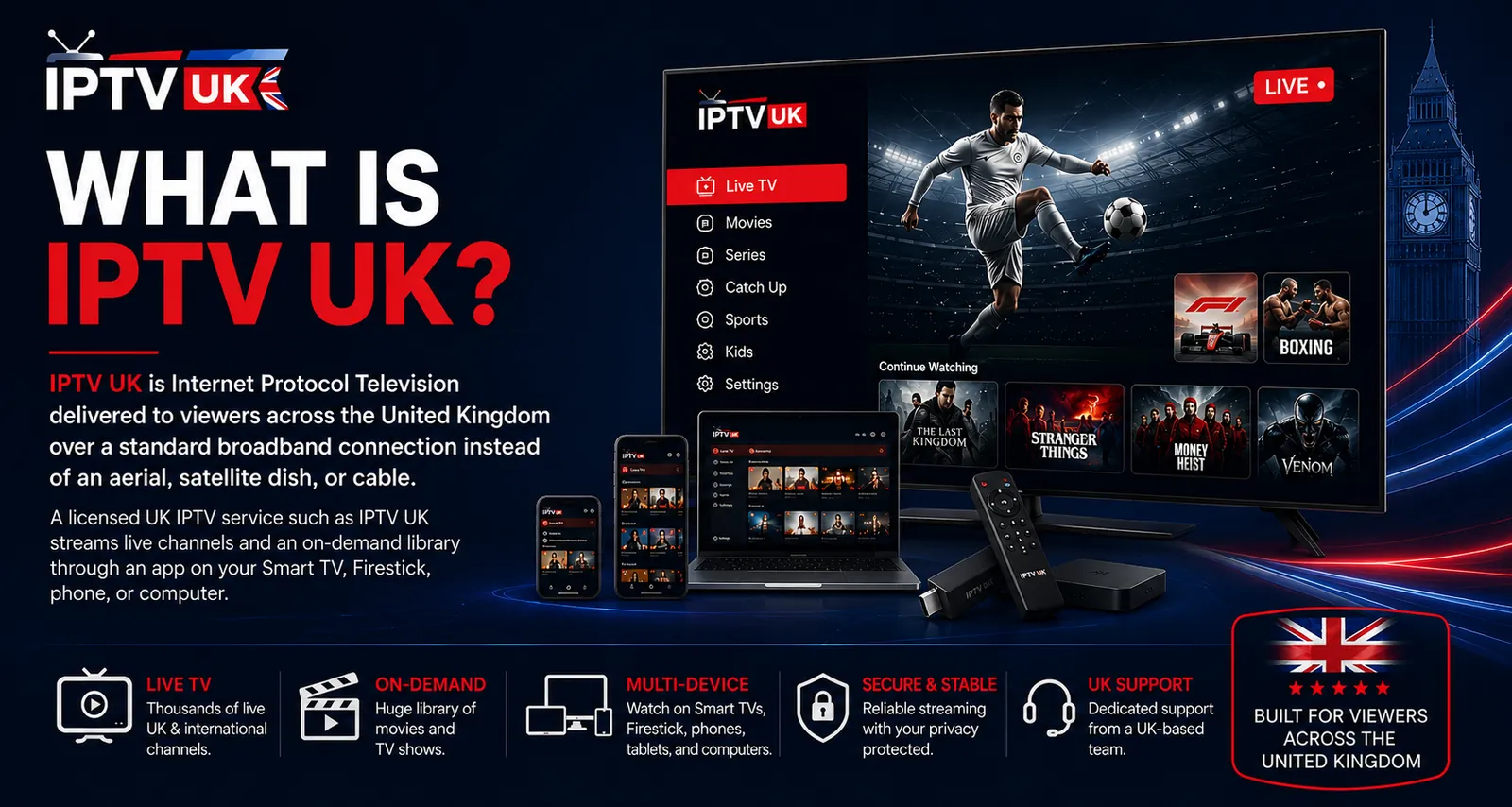
IPTV (Internet Protocol Television) is a way of delivering live TV channels and on-demand video over a standard internet connection instead of through a cable or satellite signal. You watch through an app on a Smart TV, Firestick, phone or computer, and the video streams to you on request — adapting to your connection speed in real time so playback stays smooth.
Key takeaways
IPTV means Internet Protocol Television — the telly delivered as internet data rather than over an aerial, dish or cable.
It is sent on request. Unlike broadcast, which transmits every channel at once, IPTV streams only the channel or film you choose, the moment you choose it.
Adaptive bitrate keeps it smooth. The picture scales to your broadband in real time, stepping down gracefully rather than freezing.
It runs on the kit you already own — Smart TVs, the Firestick, Android boxes, phones, tablets and the web — with no engineer and no dish.
It blends live and on-demand in one app, with a full programme guide and catch-up — the telly, modernised.
IPTV definition: what does IPTV actually mean?
The IPTV definition is simple: IPTV stands for Internet Protocol Television, which means television delivered using the same Internet Protocol that carries web pages, emails and video calls, rather than over a broadcast aerial, satellite dish or cable. The phrase looks technical, but the IPTV meaning is everyday: it is the telly, sent down your broadband line as data, and played back through an app on whatever screen you fancy.
To understand the term, it helps to split it in two. “Internet Protocol” is the universal addressing system that lets devices on the internet send information to one another in small, labelled chunks called packets. “Television” is, of course, the content — live channels, films, series, sport. Put them together and Internet Protocol Television is exactly what it says on the tin: TV that travels over the internet’s own delivery system instead of a dedicated broadcast network. That is the whole of the iptv definition, and everything else in this guide follows from it.
It is worth being precise about what IPTV is not, because the term is often muddled. IPTV is not a single app, a particular box, or a brand; it is a delivery method. Nor is it inherently different from “streaming” — IPTV is a form of streaming. The reason the industry uses the specific phrase is to describe a service that bundles live television channels with an on-demand library in one place, complete with a programme guide and catch-up, in the manner of traditional broadcast TV but delivered over IP. When people ask “what is IPTV”, that bundle — live plus on-demand, in one app, over broadband — is the practical answer.
IPTV meaning in one sentence
If you need the iptv meaning distilled to a single line for a pub-quiz moment of clarity: IPTV is television delivered over the internet on request, combining live channels and on-demand content in one app, on the devices you already own. Hold onto that sentence and the rest of this page simply fills in the detail.
How does IPTV work?
Key points
IPTV stores television on servers and sends it to you as data packets only when you request it.
Your app opens a stream to the server the moment you select a channel or film.
Adaptive bitrate scales the quality to your connection so the picture flexes rather than freezes.
IPTV works by storing television on servers and sending it to you as a continuous flow of data packets over the internet, only when you request it — the opposite of broadcast, which transmits every channel at once whether anyone is watching or not. Understanding how does IPTV work is the quickest way to grasp why it feels so different from an aerial or a dish: nothing is wasted, nothing is limited by spectrum, and the picture is shaped to your connection in real time.
Traditional television is a one-to-many broadcast. A transmitter or satellite sends every channel out simultaneously across a region, and your set-top box tunes into the one you want, discarding the rest. It is elegant but rigid: the number of channels is capped by available bandwidth, and the signal is the same whether you have a pristine line or a poor one. IPTV inverts this. The channels live on servers, and your request — “send me channel three” — travels up your broadband line; the server replies with that stream and that stream only. The journey of a single stream looks like this.
1
You choose
You open the player app and select a live channel or an on-demand title.
2
A request goes out
Your device sends a request over your broadband to the provider’s nearest server.
3
The server streams
The server returns the video as a flow of data packets — only for what you asked for.
4
It plays, adaptively
Adaptive bitrate scales the quality to your line in real time, so the picture stays smooth.
That fourth step is the quiet genius of IPTV. Because the video is delivered over IP, the service can use adaptive bitrate streaming — it monitors your available bandwidth moment to moment and nudges the quality up or down to match. On a fast fibre line you get crisp 4K; on a phone over mobile data you get a lighter stream that still plays without stalling. The picture flexes rather than freezes, which is precisely why a well-run IPTV service can feel steadier than a satellite signal that simply drops when the weather turns. When a stream does stall, the cause is usually the local network, and our guide to fixing IPTV buffering explains how to check.
Why “on request” matters
Sending television only on request has consequences that ripple through the whole experience. Channel breadth is no longer constrained by the spectrum a transmitter can carry, so a service can offer thousands of channels and a vast on-demand library side by side. The same stream can be sent to several screens in one household at once. And because the content sits on servers, features such as catch-up and a full electronic programme guide come almost for free — the server already knows what aired and when. In short, the answer to how does IPTV work is also the answer to why it can do so much more than the aerial it replaces.
Under the bonnet: the technology that makes IPTV work
Key points
Efficient codecs such as H.265 (HEVC) compress 4K into a data rate ordinary UK fibre can carry.
Content delivery networks hold the video close to viewers so it arrives quickly and reliably.
Xtream Codes logins and M3U playlists are simply how your player connects to the server.
The technology that makes IPTV work is a stack of efficient video codecs, content delivery networks and adaptive streaming logic that together compress television into data, hold it close to viewers, and shape it to each connection. None of it is visible on screen, which is the point — good engineering disappears. But a quick tour under the bonnet explains why a modern IPTV service can deliver 4K over a line that could never have carried it a decade ago.
Streams from servers — only on request
Television lives on servers and is sent only when you choose a channel, so breadth isn’t limited by spectrum.
Modern codecs — 4K on ordinary broadband
H.265 (HEVC) compresses a 4K picture into a data rate a typical UK fibre line carries with ease.
Xtream or M3U — how you connect
You point the player at the server with an Xtream Codes login or a single M3U URL from your welcome email.
No engineer, no dish — minutes to set up
Install an app and sign in; there’s no aerial to align and no four-hour installation window.
Codecs: how 4K fits down a broadband line
A raw 4K video signal is enormous — far too large to send over a domestic connection. Codecs solve this by compressing the picture intelligently, discarding only the information the eye will not miss. The workhorse for years was H.264, and the newer H.265 (HEVC) is leaner still, delivering the same quality at a markedly lower data rate. This is the single advance that turned 4K from a fantasy into something an ordinary British fibre package handles comfortably. As codecs continue to improve, the same line carries ever-crisper streams without you changing a thing.
Content delivery networks: keeping the picture close
A content delivery network, or CDN, is a distributed set of servers that holds copies of the video close to where viewers are, rather than in a single distant location. When you press play, your stream is served from a nearby node, which keeps latency low and reliability high — and crucially, spreads the load so that no single machine becomes a bottleneck when the whole country tunes in for the Saturday football. The breadth and quality of a service’s CDN is one of the invisible factors that separates a steady IPTV experience from a stuttering one.
Unicast, multicast and how it scales
There are two broad ways to send IPTV. A unicast stream is a private, one-to-one delivery from server to viewer — perfect for on-demand, where everyone wants something different. Multicast sends a single stream to many viewers at once, which is efficient for popular live channels. A capable provider blends both, choosing the right method for the moment, which is part of how a service stays smooth when demand peaks. You never need to think about any of this; it simply explains why a properly engineered service holds up where a thin one falls over.
What you need to use IPTV
Key points
You need broadband, a compatible device and a player app — nothing more.
4K needs roughly 25 Mbps per stream; HD around 8 Mbps; most UK fibre has ample headroom.
A wired connection or the 5GHz band gives the steadiest result.
To use IPTV you need just three things: a broadband connection, a compatible device such as a Smart TV, Firestick, Android box, phone, tablet or computer, and a player app. There is no dish to mount, no aerial to align and no engineer’s visit to book — you install an app, sign in with the details your provider emails you, and the channel list and programme guide populate within a few minutes.
The one figure worth knowing is bandwidth. Each quality tier needs a certain sustained download speed per stream, and the reassuring news is that most modern UK fibre packages clear those figures with room to spare. The chart below shows the approximate requirements.
Bandwidth required per IPTV stream (approximate)
Sustained download speed needed for smooth playback at each quality tier.
SD (standard)3 Mbps
HD (720–1080i)8 Mbps
Full HD (1080p)13 Mbps
4K UHD25 Mbps
Per simultaneous stream. A household watching several screens at once should add these figures together when sizing its broadband.
Devices: the kit you already own
One of the quiet pleasures of IPTV is that it runs on hardware most homes already have. Samsung and LG Smart TVs, the Amazon Firestick, Android TV boxes, iPhones, iPads, Android phones, Windows and macOS computers, and the web browser will all run a player. For the best result on your main telly, a wired Ethernet connection is the gold standard, with the 5GHz band of a modern router a close second. When you are ready, our step-by-step device setup guides and player setup guides walk through each platform in detail.
The three types of IPTV: live, on-demand and catch-up
Key points
Live IPTV streams channels in real time, exactly like broadcast television.
Video on demand (VOD) is a library of films and series you start whenever you like.
Catch-up (time-shifted) lets you watch a programme after it has aired.
IPTV comes in three forms: live television streamed in real time, video on demand from a searchable library, and catch-up (time-shifted TV) that lets you watch programmes after they have aired. The best services blend all three seamlessly in one app, so the distinction matters less to you than to an engineer — but understanding the three types makes the whole category click into place.
Type
What it is
Typical use
Live IPTV
Channels streamed in real time, exactly as they broadcast
The weekend football, the news
Video on demand (VOD)
A searchable library of films and series to start any time
A Bank Holiday box-set binge
Catch-up / time-shifted
Programmes available to watch after they have aired
The episode you missed midweek
In day-to-day use, the three blur together pleasantly. You might open the app to catch the live three o’clock kick-off, drift into a film from the on-demand library afterwards, and later rewind a drama you missed on Tuesday — all without leaving the same interface. That unification of live, on-demand and catch-up, under one programme guide, is a large part of what people mean when they describe IPTV as “the telly, modernised”.
IPTV vs cable, satellite and Freeview
Key points
IPTV uses your broadband; cable, satellite and Freeview use dedicated broadcast infrastructure.
IPTV runs on the devices you own and blends live with on-demand in one app.
Because it arrives over broadband, IPTV is unaffected by the rain fade that interrupts satellite.
The core difference between IPTV and cable, satellite or Freeview is the delivery method: IPTV sends television over your ordinary broadband line on request, while the traditional platforms broadcast every channel at once over dedicated cable, dish or aerial infrastructure. That single distinction cascades into the everyday differences viewers actually feel — in device choice, on-demand depth, weather resilience and flexibility.
Factor
Cable / satellite / Freeview
IPTV
Delivery
Dedicated coaxial, dish or aerial
Your broadband line
Channels sent
All at once; box tunes in
Only what you request
Devices
Proprietary box or TV tuner
Smart TV, Firestick, phone, web
On demand
Limited or separate
Built in, alongside live
Bad weather
Satellite: rain fade
Unaffected — broadband
Setup
Aerial or engineer & dish
App, a few minutes
The weather row is the one every British viewer recognises. A satellite signal travels through the atmosphere and is vulnerable to rain fade — the picture breaking into blocks during a downpour, invariably at the worst possible moment of the match. An IPTV stream arrives down the same fibre that is unbothered by what the sky is doing, so it keeps playing through the wind and rain of a January evening. For a deeper buyer-focused comparison, our best IPTV provider guide scores services against the criteria that predict a good experience.
“The simplest way to understand what IPTV is: it takes everything an aerial, a dish and a stack of streaming apps used to do separately, and delivers it down one broadband line, in one app, on any screen in the house.”
— IPTV, in a sentence
A short history of Internet Protocol Television
Internet Protocol Television emerged in the 1990s as broadband matured, moved into mainstream telecoms offerings through the 2000s, and became the dominant way the world watches as fibre and efficient codecs made high-quality streaming ordinary. Knowing the arc helps explain why IPTV feels less like a gadget and more like the natural endpoint of decades of steady progress.
The idea is older than many realise. As soon as broadband connections became fast enough to carry video, engineers began experimenting with sending television over the same networks that carried web traffic — the literal meaning of internet protocol television. Through the 2000s, telecoms companies around the world started bundling IPTV with their broadband packages, delivering live channels and video on demand over managed networks. The technology proved itself at scale, carrying major events to millions of homes.
What changed everything was the convergence of three trends: the spread of fast, affordable fibre broadband; the arrival of efficient codecs that squeezed high-definition and then 4K into manageable data rates; and the proliferation of smart devices — televisions, sticks, phones — that could run a player app without any special hardware. Together these turned IPTV from a managed telco product into something any household could adopt over its ordinary connection. Today, the question is no longer whether television will be delivered over the internet, but how quickly the last of the old broadcast habits will give way to it.
IPTV in British homes
Key points
IPTV suits the British viewing year, from the Premier League weekend to the festive schedule.
Streaming over broadband holds up through the weather that interrupts satellite.
One subscription consolidates what used to take an aerial, a dish and several apps.
For British households, IPTV is unusually well suited to the way we actually watch — built for the weekend football, the Bank Holiday binge, the box-sets and the festive schedule, all delivered reliably over broadband whatever the weather is doing outside. The British viewing year concentrates television into predictable peaks, and IPTV’s on-request, broadband-delivered model is engineered for exactly those moments.
Consider the rhythm of it. The British weekend has a particular shape — the early kick-off, the three o’clock fixtures, the late game, then the pub post-mortem on Monday — and IPTV carries it to every screen in the house at once, in up to 4K, without the picture dissolving when it lashes down outside. Around that sit the soaps and dramas that anchor weeknights, the panel shows, the nature documentaries, and the unmatched Christmas and Boxing Day schedule. Because it is delivered over the same fibre that runs the rest of the home, the British weather that routinely interrupts a satellite dish simply stays outside.
There is a social dimension, too. So much of British life is organised around shared viewing — the banter about the weekend’s results, the family debate over the festive schedule, the group chat lighting up at full-time. IPTV consolidates the live channels, the sport and the on-demand library that used to require an aerial, a dish and a stack of separate apps into one tidy service, so the only thing anyone has to think about is what to watch next.
Is IPTV legal in the UK?
IPTV the technology is completely legal — it is simply a delivery method, used by major broadcasters and telecoms worldwide. What matters is availability: a legitimate provider distributes only content it is entitled to carry, charges a transparent subscription, and does not require a VPN to conceal your activity. IPTV UK is a premium service and streams only rights-cleared content. The classic warning sign of a service to avoid is the opposite of all that — thousands of premium channels for a couple of pounds, no statement about where the content comes from, and an insistence that you install a VPN. Learn how to tell a premium service from a cut-rate one in our best IPTV UK buyer’s guide, and see our full answer on whether IPTV is legal in the UK.
Common myths and misconceptions about IPTV
Key points
IPTV is not inherently dodgy — it is the mainstream delivery method for modern television.
It does not require a powerful computer or a fast, complicated setup.
“8K” channels do not exist in mainstream broadcasting; the claim is marketing fiction.
The biggest misconception about IPTV is that it is somehow inherently dubious, when in fact it is the mainstream way the modern world delivers television. A handful of myths cloud the picture, usually born from confusing the legitimate technology with the cut-rate operators who misuse it. Clearing them up makes the definition of IPTV sharper still.
Myth: IPTV is illegal. The technology is entirely legal; legality depends solely on whether a provider has the right to distribute its content. Major broadcasters and telecoms deliver IPTV every day. Myth: you need a powerful computer or technical know-how. In reality, setup is an app install and a sign-in, usually done inside five minutes on a television you already own. Myth: IPTV is unreliable by nature. A properly engineered service, with redundant servers and a good content delivery network, is exceptionally stable; instability is a hallmark of cut-rate operators, not of the technology. Myth: more resolution claims mean better quality. No mainstream broadcast is mastered in true 8K, so any service advertising 8K channels is selling marketing fiction — a reliable sign that the rest of its claims deserve scepticism.
IPTV, explained in four ideas
Delivered over broadband — not an aerial
IPTV sends television to you as data over your internet line, replacing the rooftop aerial, satellite dish and cable.
Live + on-demand — in one app
A single interface unifies live channels and a searchable on-demand library, accessible on any screen you own.
Adaptive bitrate — smooth on any line
The stream scales its quality to your connection in real time, stepping down gracefully rather than freezing.
Full EPG & catch-up — the telly, modernised
An on-screen guide shows what is on now and next, and catch-up rewinds the programmes you missed midweek.
How to set up IPTV in a few minutes
Key points
Setup is three steps: install a player, sign in, and let the channels and guide populate.
No aerial, no dish and no engineer’s visit are required — you keep the kit you own.
A wired connection or the 5GHz band gives the steadiest first experience.
Setting up IPTV takes about five minutes and three steps: install a player app on your chosen device, sign in with the credentials your provider emails you, and let the channel list and programme guide load. Having just understood what IPTV is and how it works, the practical reality is reassuringly mundane — there is nothing to drill, mount or align, which is the single biggest everyday advantage of internet protocol television over a traditional installation.
The exact taps differ by device, but the shape is identical everywhere. On a Firestick or Smart TV you install the player from the device’s own app store; on Android or iOS you do the same from Google Play or the App Store; on a laptop you simply open the web player in a browser. You then enter the details from your welcome email — typically a username, password and server address for an Xtream Codes login, or a single M3U URL — pasted in once. The app builds your channel list and electronic programme guide automatically, and from there you open Live TV or the on-demand library and press play.
A few habits make the experience flawless from the first night. Connect your main television by wired Ethernet where you can, or sit it on the 5GHz band of a modern router rather than the slower, more congested 2.4GHz band. Enable your player’s hardware decoder so the picture is handled by the chip built for it. And if you are on a slower line, match your quality tier to your broadband rather than forcing 4K through a connection that cannot sustain it. Our step-by-step device setup guides cover Smart TV, Firestick and Android in detail, while the player setup hub explains how to configure the apps themselves.
IPTV picture quality: SD, HD, Full HD and 4K explained
Key points
IPTV delivers genuine SD, HD, Full HD and 4K — the tier you get depends on the source and your line.
Adaptive bitrate means the quality flexes to your connection rather than failing outright.
No mainstream broadcast is made in true 8K, so “8K” claims are marketing fiction.
IPTV picture quality spans four genuine tiers — standard definition, HD, Full HD and 4K Ultra HD — and which one you receive depends on the resolution of the source and the headroom on your broadband, with adaptive bitrate smoothing the transitions between them. Quality is not a single switch but a negotiation, and understanding that negotiation explains why the same channel can look pristine in the lounge and perfectly watchable on a phone over mobile data.
Tier
Resolution
Best for
SD (standard)
Up to 576 lines
Phones, weak connections
HD
720p–1080i
Tablets, smaller screens
Full HD
1080p
Most living-room tellies
4K Ultra HD
2160p
Big-screen sport & film
The reason a modern service can offer 4K at all is the efficiency of contemporary codecs, principally H.265 (HEVC), which compress an Ultra HD picture into a data rate ordinary British fibre carries comfortably. Adaptive bitrate then does the clever part: it monitors your line moment to moment and steps the quality down a notch the instant your bandwidth dips, climbing back up when it recovers. The result is a picture that softens almost imperceptibly under strain rather than collapsing into the dreaded spinning wheel. It is also why honest providers publish sensible bandwidth guidance instead of plastering inflated resolution claims across their marketing — no mainstream broadcast in 2026 is mastered or transmitted in true 8K, so any “8K” channel is fiction, and a reliable tell that the rest of the marketing deserves scepticism.
IPTV and your broadband: getting the smoothest stream
Key points
A stable connection matters more than a fast but erratic one.
Wired Ethernet is the gold standard; 5GHz Wi-Fi is a strong second.
Most buffering is a local connection issue, not the service itself.
The smoothest IPTV experience comes from a stable connection rather than simply a fast one, which is why a wired Ethernet link to your main television beats even a quick but congested Wi-Fi signal. Because IPTV is delivered over your broadband, the quality of that last stretch — from your router to your telly — often matters more than the headline speed on your bill. The good news is that the fixes are simple and within your control.
Consistency is the watchword. A steady 30 Mbps will out-perform a connection that spikes to 100 Mbps and then sags, because adaptive bitrate responds to the dips, not the peaks. A wired connection removes Wi-Fi variability entirely and is the single most effective upgrade for a fixed television. Where wiring is impractical, the 5GHz band of a modern router is markedly steadier than the older 2.4GHz band, especially if you move the device closer to the router and away from thick walls and the microwave. Pausing large downloads, game updates and other 4K streams on the network during a marquee fixture frees up the headroom the match needs.
It is worth knowing that the overwhelming majority of buffering complaints trace back to the local connection rather than the service. When a picture wobbles, the quickest diagnosis is to test a different device on the same line, or the same device on a wired connection; if the problem follows the connection, it is the connection. A genuinely well-engineered provider, of course, holds up its end with redundant servers and a strong content delivery network — the very infrastructure that separates a steady service from a flaky one — but the household’s own line is where most smoothness is won or lost.
Who is IPTV for?
Key points
IPTV suits cord-cutters, big families, sports fans and British expats especially well.
One subscription replaces an aerial, a dish and a stack of separate apps.
If you have broadband and a Smart TV or Firestick, you already have everything you need.
IPTV suits anyone with a broadband line who wants more choice and more control than traditional television offers — but it is especially well matched to cord-cutters, large households, sports fans and British expats. Because the technology runs on ordinary kit and bundles everything into one app, it tends to solve a specific frustration for each of these groups rather than offering a vague improvement.
The cord-cutter, tired of a rising satellite bill and an 18-month contract, gains a flexible, prepaid alternative that runs on the telly they already own. The large family, juggling several streaming apps and still missing the match, gains one subscription with multiple simultaneous streams, so the kids’ film, the lounge fixture and the bedroom box-set can all run at once. The sports fan gains the weekend football and the big midweek nights in up to 4K, on a service engineered to hold up under the kick-off rush.
And the British expat gains a thread of home — the familiar channels and the soaps followed for years — streamed over whatever connection is to hand, wherever they happen to be. The common thread is consolidation: IPTV gathers what used to require an aerial, a dish and a clutch of apps into a single, tidy service. If you already have broadband and a Smart TV or a Firestick, you have everything you need to begin.
The future of Internet Protocol Television
The future of internet protocol television is one of steady, compounding improvement: faster fibre, leaner codecs and smarter delivery are making premium streaming the default rather than the exception, and the practical gap with traditional broadcast keeps widening in IPTV’s favour. Having understood what IPTV is today, it is worth a glance at where it is heading, because the direction of travel is unusually clear.
Three forces are doing the work. The continued rollout of full-fibre broadband across the UK is giving more homes the sustained, low-latency bandwidth that high-quality streaming rewards, so running several 4K streams at once becomes ordinary rather than exceptional. Video codecs keep improving — each generation delivers the same picture at a lower data rate, which means crisper streams on the very same line, with no action required from you. And delivery itself grows cleverer, with content held ever closer to viewers and adaptive logic that flexes the picture so seamlessly you never notice it working. Together, these trends mean a service chosen well today will quietly get better underneath you as the wider infrastructure does.
For anyone weighing up the move, the implication is reassuring. The fundamentals that define good internet protocol television — reliability, breadth, honest quality and the freedom to watch on any screen — are not a passing trend but the natural endpoint of decades of progress. The aerial and the dish belong to a broadcast era that is gently winding down; the telly, increasingly, simply arrives down the same line that runs the rest of the modern home. When you are ready to see it for yourself, the simplest next step is to test a service on your own broadband and devices with a free trial.
IPTV vs streaming services: what is the difference?
Key points
IPTV is a form of streaming — the terms overlap rather than oppose.
“IPTV” usually describes a service that bundles live channels with on-demand in one app.
Generic streaming apps are mostly on-demand; IPTV brings back the live programme guide.
The difference between IPTV and a streaming service is one of emphasis, not technology: both send video over the internet, but “IPTV” describes a service built around live television channels and a programme guide, whereas most streaming apps are libraries of on-demand titles. If you have followed the question of what is IPTV this far, this distinction is the last piece of the puzzle — and it explains why the two phrases are used differently even though, technically, IPTV is simply a particular kind of streaming.
Think of it as a spectrum. At one end sit the familiar on-demand apps: you open them to pick a film or an episode, and there is no live schedule to speak of. At the other end sits broadcast television, all live channels and a programme guide, with little or no on-demand. IPTV deliberately occupies the middle: it brings the live channels and the electronic programme guide of broadcast together with the searchable on-demand library of a streaming app, in one interface. That is the heart of the iptv meaning, and it is why people who miss the structure of live telly — the three o’clock kick-off, the ten o’clock news — gravitate to IPTV rather than to a pure on-demand service.
There is also a practical difference in how the two feel day to day. A stack of separate streaming apps fragments your viewing across several logins, several bills and several interfaces; you hop between them and still find the live match is not there. IPTV consolidates the lot — live, on-demand and catch-up — behind a single guide, so the question stops being “which app is it on?” and becomes simply “what shall we watch?” For many households, that consolidation is the entire appeal, and it is the most useful way to answer what IPTV is to someone weighing it against the apps they already use.
IPTV, jargon-free: a recap of what IPTV is
Key points
What is IPTV? Television delivered over your broadband on request, not over an aerial or dish.
It blends live channels, on-demand and catch-up in one app, on the screens you own.
The technology is mainstream and legal; quality and reliability depend on the provider.
To recap in plain English: IPTV is television delivered over your broadband connection on request, blending live channels, an on-demand library and catch-up into a single app that runs on the devices you already own. Strip away the acronyms and the iptv definition is genuinely simple — it is the telly, modernised, sent down the same line that carries everything else in your home.
Everything in this guide flows from that one idea. Because the content sits on servers and is sent only when you ask for it, breadth is not limited by spectrum, the same stream reaches several screens at once, and features such as the programme guide and catch-up come almost for free. Because it is delivered over the Internet Protocol, adaptive bitrate can shape the picture to your line in real time, so it flexes rather than freezes. And because it rides your ordinary broadband, it sidesteps the rain fade that interrupts a satellite dish — the picture holds through the wind and rain of a British winter. If you are sizing up your own line before you begin, a quick test on a recognised checker such as Ofcom’s broadband resources will confirm whether you clear the bandwidth figures set out above.
So the next time someone at the pub asks what is IPTV, you have a clean answer ready: it is internet protocol television — live TV and on-demand video over broadband, on any screen, with no aerial and no dish — and a properly run service makes it feel less like a technology and more like the telly simply working the way it always should have. When you want to put that to the test, our best IPTV UK guide explains how to judge a provider, and a free trial lets you see it on your own broadband and devices before committing a penny.
Is IPTV worth it? The bottom line
For most British households with a reliable broadband line, IPTV is well worth it — it consolidates live television, sport and a vast on-demand library into one flexible, no-contract service that runs on the screens you already own. Having worked through what IPTV is, how it works and how it compares to the aerial and the dish, the practical verdict is straightforward: the technology removes friction rather than adding it.
The value shows up in three everyday ways. There is the consolidation — one app and one bill in place of an aerial, a dish and a clutch of streaming subscriptions. There is the flexibility — prepaid terms with nothing recurring quietly in the background, and multiple screens under one account so the whole household is catered for at once. And there is the resilience — a picture that holds through the British weather and the kick-off rush, provided the service is engineered properly. The one genuine caveat is that quality varies enormously between providers: the technology is excellent, but a cut-rate operator can still deliver a poor experience, which is precisely why it pays to choose carefully and to test before you commit.
That is the honest answer to whether IPTV is worth it — a clear yes for the right household, paired with a clear instruction to pick a reliable, rights-respecting provider. To judge one against the criteria that actually predict a good experience, read our best IPTV UK guide, and to settle the question on your own broadband and devices, start a free trial.
Key IPTV terms, explained
A handful of terms recur whenever IPTV is discussed. Here they are, defined plainly for UK viewers, so the jargon never gets in the way of the definition.
M3U URL
A single link containing your full playlist of channels and on-demand titles. You paste it into a player to load everything at once.
Xtream Codes API
A login method using a username, password and server URL. It pulls live TV, VOD and the programme guide automatically and keeps them updated.
EPG (Electronic Programme Guide)
The on-screen TV guide showing what is on now and next across your channels.
VOD (Video on Demand)
A library of films and shows you can start any time, separate from live channels.
Catch-up (time-shifted TV)
The ability to watch a programme after it has aired on supported channels — a missed episode is never truly missed.
Adaptive bitrate
Technology that adjusts stream quality to your connection speed in real time to prevent buffering.
Codec (H.264 / H.265 HEVC)
Software that compresses video so a 4K picture fits down an ordinary broadband line without visible loss.
CDN (Content Delivery Network)
A distributed set of servers that holds the video close to viewers so it arrives quickly and reliably.
Unicast & multicast
Two ways to send a stream: one-to-one for on-demand, and one-to-many for popular live channels.
Simultaneous streams
How many screens can watch on one account at the same time — key for households.
Frequently asked questions
What is IPTV?
IPTV (Internet Protocol Television) is a way of delivering live TV channels and on-demand video over a standard internet connection instead of through a cable or satellite signal. You watch through an app on a Smart TV, Firestick, phone or computer, and the video streams to you on request, adapting to your connection speed in real time.
What does IPTV stand for and what does it mean?
IPTV stands for Internet Protocol Television. The meaning is straightforward: television delivered using the same Internet Protocol that carries web pages and video calls, rather than over a broadcast aerial, satellite dish or cable.
How does IPTV work?
IPTV works by storing television on servers and sending it to you as data packets over the internet only when you request it. When you select a channel, your app opens a stream to the server, and adaptive bitrate technology scales the quality to your connection so playback stays smooth.
What is the difference between IPTV and streaming?
There is no fundamental difference — IPTV is a form of streaming. The term IPTV usually describes a service that combines live television channels with an on-demand library in one app, whereas streaming is the general term for any video delivered over the internet.
Is IPTV the same as cable TV?
No. Cable TV broadcasts every channel at once over dedicated coaxial infrastructure and your box tunes into one. IPTV delivers television over your ordinary broadband line, sending only the channel you request, and runs on apps across the devices you already own.
What do I need to use IPTV?
You need a broadband connection, a compatible device such as a Smart TV, Firestick, Android box, phone, tablet or computer, and a player app. You then sign in with the details from your provider, and the channel list and guide populate automatically.
How much internet speed do I need for IPTV?
You need roughly 25 Mbps per stream for 4K, around 13 Mbps for Full HD, about 8 Mbps for HD and 3 Mbps for standard definition. Most modern UK fibre packages have ample headroom for several simultaneous streams.
Is IPTV legal in the UK?
IPTV as a technology is entirely legal; it is simply a delivery method used by major broadcasters and telecoms worldwide. Legality depends on the provider distributing only content it is entitled to carry. A rights-respecting service streams rights-cleared content and does not require a VPN.
Can I watch IPTV on a Smart TV?
Yes. IPTV runs natively on Samsung and LG Smart TVs, the Amazon Firestick, Android TV boxes, phones, tablets, computers and the web. You install a player app, sign in, and the channels and guide load within a few minutes.